The Mirror's homepage makes 158 requests. Block the trackers in five minutes
News homepages quietly load dozens of ad and tracking scripts before you've read a word. Install the right uBlock Origin for your browser, prove it works, then cover your phone too. Free, no account.
14 minBeginnerTools: FreeStep 1 free
Tested 7 Oct 2026 · uBlock Origin Lite 2026.1006.1931, Chromium 151, Windows 11The genuine uBlock Origin (or its Lite version) installed, not a look-alike
Ads and trackers blocked on every site, from the moment it's installed
A 30-second test that proves it's working, and a one-click way to let a site through
- Your phone covered as well, with a built-in setting and no app to install
Before you start
01/06Pick the right version for your browser0 done- Chrome, Edge, Firefox or Safari on a computer, plus your phone for the last step
- Permission to install browser extensions (a work laptop may block this)
- No account, no payment, no terminal
STEP 01 of 06~2 min
Pick the right version for your browser
There are two versions now, and the one you used to install may not work in your browser any more.
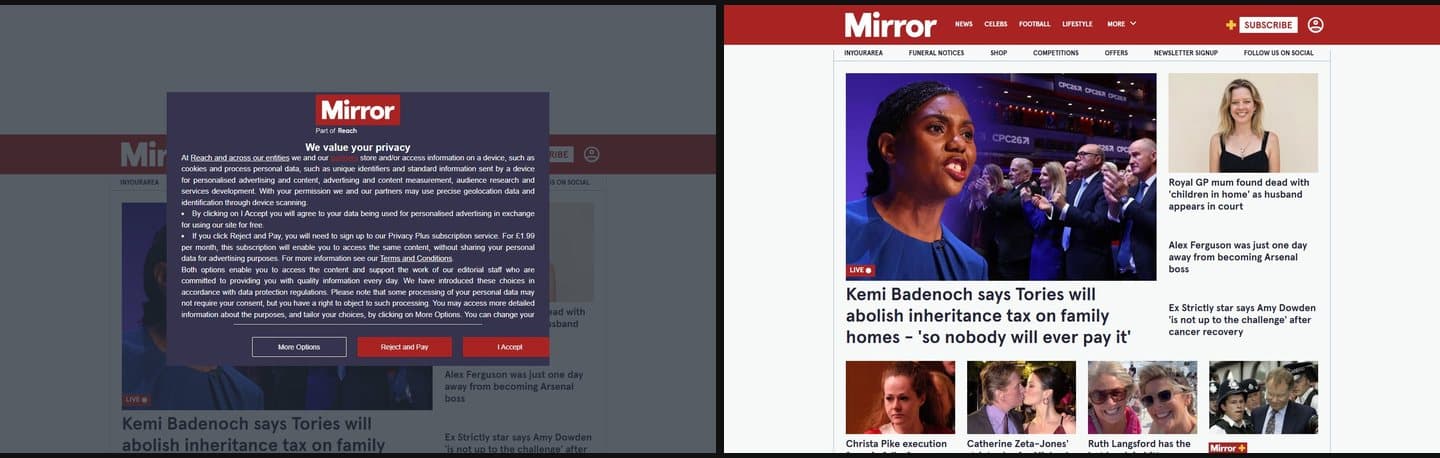
Where you're heading. Left: the Mirror with no blocker. Right: the same page with uBlock Origin Lite, 28 requests blocked and the news straight away. uBlock Origin is a free, open-source ad and tracker blocker made by Raymond Hill (gorhill). Chrome's new extension rules (Manifest V3) don't fit the full version, so he also makes uBlock Origin Lite, built for them. Pick by browser:
- Chrome: Lite. The full version was removed from the Chrome Web Store on 31 August 2026.
- Edge: Lite. Microsoft is switching off old-style extensions for home users by the end of 2026.
- Firefox: the full uBlock Origin. The developer says it works best there, including Firefox for Android.
- Safari (Mac): Lite, from the App Store.
Lite uses the same main filter lists (EasyList, EasyPrivacy, Peter Lowe's list and uBlock's own). It drops some advanced controls you won't miss for install-and-forget use.
CarefulSearch the extension stores for "ublock" and you'll find copycats with similar names and logos. Some are just ad-supported clones, some are worse. Only install from the links in the next step, and check the developer is Raymond Hill (gorhill). It's free and always will be: anything asking for money or a sign-up is not the real one.
✓
CheckpointYou know which version you need: Lite for Chrome, Edge and Safari, the full version for Firefox.
Next mission · Go darkSee which servers and countries your PC talks to
→