Build your own MCP server so Claude can use your tools
MCP is the plug that lets an AI app use your own code. Write a small Python server that lets Claude search your notes, add to your to-do list and check the weather, then plug it into Claude Desktop and Claude Code. It can only touch the one folder you choose.
- A clear idea of tools vs resources vs prompts, and how to keep a server locked to one folder with no secrets in sight
- Level 0 done: Install anything from GitHub, safely and The terminal survival kit.
- uv, the fast Python installer:
winget install --id astral-sh.uv -eon Windows, orcurl -LsSf https://astral.sh/uv/install.sh | shon a Mac or Linux. It downloads the MCP Python SDK (about 60MB) and a suitable Python for you. - Node.js 22.19 or newer, only for the MCP Inspector in step 3. Check with
node --version. Get the LTS version from nodejs.org ↗ if you need it. - One Claude app to connect to. Claude Desktop ↗ (Windows and macOS) works on the free plan. On Linux, use Claude Code. Claude Code ↗ (Windows, macOS and Linux) needs Pro or above (current prices ↗). You need a Claude account either way, and you sign in yourself.
- An internet connection for the weather tool. It uses Open-Meteo ↗, which needs no key and is free for non-commercial use (under 10,000 calls a day).
- You can read a little Python. Every file is complete and in the starter kit.
Understand what MCP is, and what you're about to build
Two minutes of vocabulary makes every later step obvious.
MCP (Model Context Protocol) is an open standard for connecting AI apps to other software. The official introduction ↗ compares it to a USB-C port: one shape of plug, so any app that speaks MCP can use any server that speaks MCP. You write a small program once, and Claude Desktop, Claude Code, VS Code, Cursor and others can all use it.
The host is the AI app you talk to (Claude Desktop or Claude Code). The server is what you build. The host starts it, asks it what it offers, and asks your permission before using it. Your server never talks to the AI model directly.
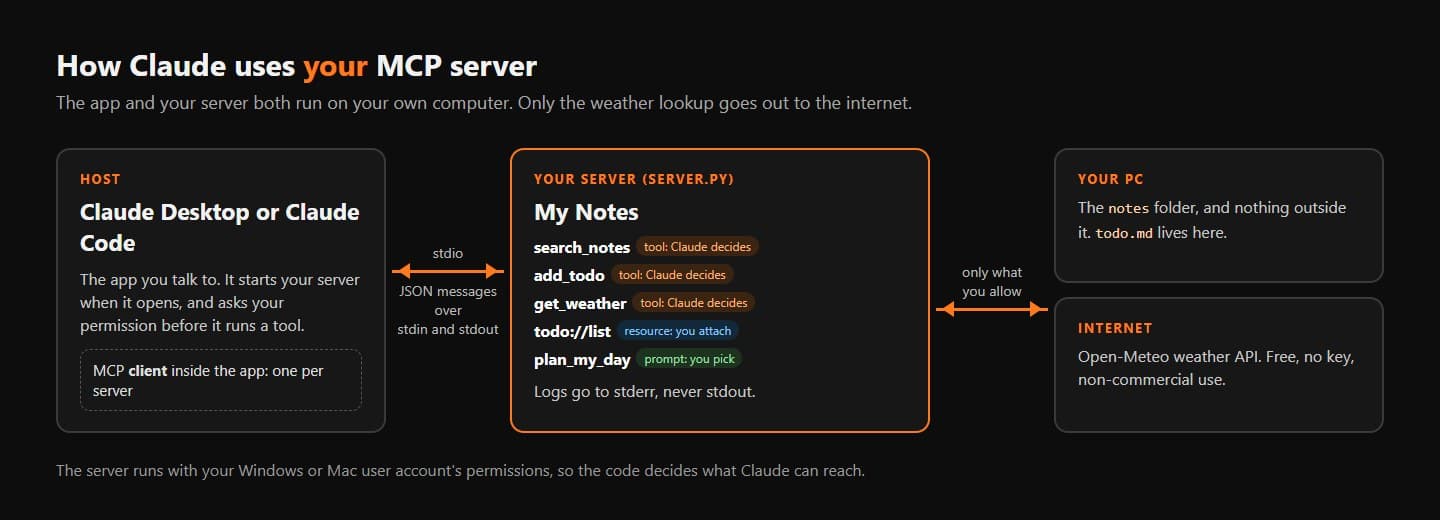
What you'll have by the end. Nothing listens on a network port: the app starts your server and talks to it through pipes. Tools, resources and promptsA server can offer three kinds of thing. The Python SDK's guide ↗ separates them by who decides to use them:
- Tools are chosen by the model. A function Claude can call to do something: search, write, fetch. Yours are
search_notes,add_todoandget_weather. - Resources are chosen by the app or by you. Read-only data attached to the conversation, like a file. Yours is
todo://list, your to-do list. - Prompts are chosen by you. A saved message template you pick from a menu or as a slash command. Yours is
plan_my_day.
- Tools are chosen by the model. A function Claude can call to do something: search, write, fetch. Yours are
How they talkClaude starts
server.pyand they swap messages through its standard input and output (the stdio transport). Nothing listens on a port, so nobody else on your Wi-Fi can reach it.Check your tools. All three commands should print a version number:
Terminaluv --version node --version npx --versionTipOlder MCP tutorials start withfrom mcp.server.fastmcp import FastMCP. That's version 1 of the Python SDK. Version 2 renamed the class toMCPServerand moved the import, so old code fails withNo module named 'mcp.server.fastmcp'. This mission is pinned to version 2.3 of the SDK. The migration guide ↗ lists every change if you meet old code.Two import lines, one classThe kit uses
from mcp.server import MCPServer. The SDK's own docs often writefrom mcp.server.mcpserver import MCPServer. Both work in 2.3, because the shorter one simply re-exports the longer one, so code copied from either source runs unchanged.
uv --version prints a version, node --version prints v22.19 or newer, and you can say which of tools, resources and prompts the model picks by itself (tools).If it breaks'uv' is not recognised + 1 more
'uv' is not recognised
winget install --id astral-sh.uv -e (Windows) or curl -LsSf https://astral.sh/uv/install.sh | sh (Mac or Linux), then close the terminal and open a new one.