Find the move that lost your last chess game
Stockfish, the world's strongest chess engine, is free and runs on your own laptop. You'll talk to it directly, then run a short Python script that marks every inaccuracy, mistake and blunder in a game and shows you the move you should have played.
- A picture of the worst moment of the game, with the move that was played and the move Stockfish wanted
- A Windows, Mac or Linux computer with about 200MB of free disk space (the folder comes to about 100MB, and uv may download Python 3.12 if you don't have it)
- uv, a small official tool that installs Python projects cleanly. Step 4 shows how to get it
- A chess game as a PGN file (step 6 shows how to download yours from Chess.com or Lichess), or the sample game
- No chess engine or Python experience. You'll paste the code, not write it
Download Stockfish and check it's the real thing
Stockfish is one program file. Getting it from the official page, and checking its fingerprint, means you know exactly what you're running.
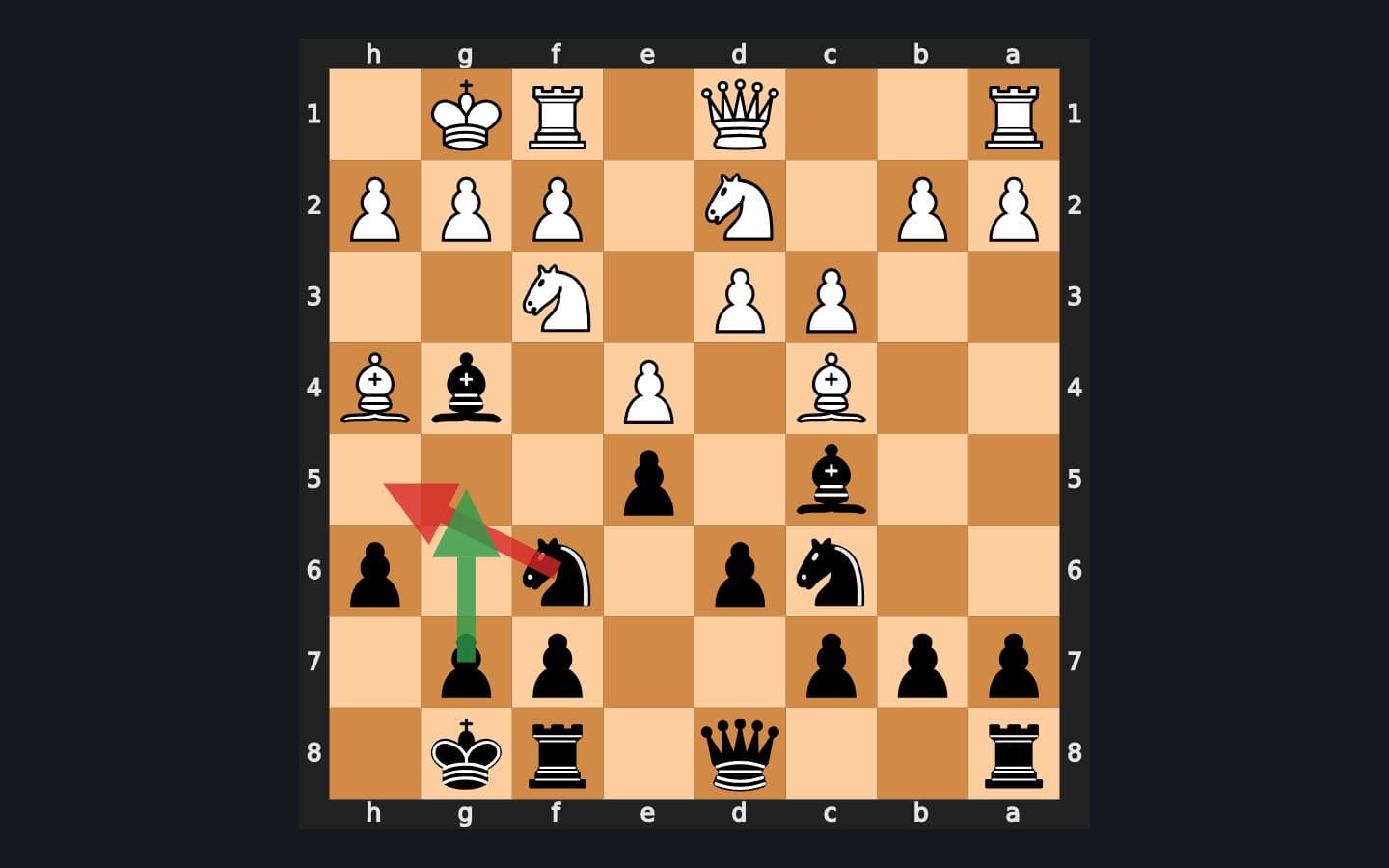
Where you're heading: the worst move of a game, found by Stockfish. Red is the move that was played, green is the move that would have held. Stockfish ↗ is a free, open-source chess engine. It has no board and no buttons: you give it a position, it searches millions of possible moves, and it tells you the best one and who's winning. Many chess apps and websites use it behind the scenes.
Older guides tell you to pick a version called AVX2, BMI2 or VNNI to match your processor. Since Stockfish 19 (September 2026) there's a single Windows download that checks your processor and picks the fastest code by itself, so there's nothing to choose.
On a Mac, Homebrew has Stockfish 19 ready to go. Open Terminal, run the two lines below, then skip to step 2 (use
stockfishwherever the steps say.\stockfish\stockfish-windows-x86-64-universal.exe):Macmkdir chess-coach && cd chess-coach brew install stockfishOn Windows, open PowerShell. Make a folder, go into it, and download Stockfish (78MB) with the
curl.exeprogram that comes with Windows:Terminalmkdir chess-coach cd chess-coach curl.exe -L -o stockfish.zip https://github.com/official-stockfish/Stockfish/releases/download/sf_19/stockfish-windows-x86-64-universal.zipNow print the file's fingerprint (its SHA-256 hash):
Terminal(Get-FileHash stockfish.zip).HashOutput3C8BF1F9EA66A09350A40DF4F632288285AC206D99F33AB5842C408FC30B48A7Open the Stockfish 19 release page ↗ and find
stockfish-windows-x86-64-universal.zipin the list of files. GitHub shows asha256:line next to it. It must be the same string of letters and numbers (GitHub shows it in lower case, which doesn't matter). If it matches, unzip the file and delete the zip:TerminalExpand-Archive stockfish.zip -DestinationPath . Remove-Item stockfish.zip dir stockfish\*.exeOutputMode LastWriteTime Length Name ---- ------------- ------ ---- -a---- 05/09/2026 08:26 103046300 stockfish-windows-x86-64-universal.exeThat 103MB file is the whole engine, including the neural network it uses to judge positions. Nothing gets installed, and nothing is added to your Start menu.
On Linux (x86-64), it's the same idea with the Linux file. Check the fingerprint against the release page, then unpack it:
Linuxmkdir chess-coach && cd chess-coach curl -L -o stockfish.tar.gz https://github.com/official-stockfish/Stockfish/releases/download/sf_19/stockfish-linux-x86-64-universal.tar.gz sha256sum stockfish.tar.gz tar -xzf stockfish.tar.gz && rm stockfish.tar.gz ls stockfish/stockfish-linux-*On Linux, use
./stockfish/stockfish-linux-x86-64-universalwherever the steps say.\stockfish\stockfish-windows-x86-64-universal.exe.TipA newer version out? Use the latest file for your system from the releases page ↗ and change the address in the download command.
stockfish folder (on a Mac, stockfish on its own starts the engine; type quit to leave).If it breaksA parameter cannot be found that matches parameter name 'L' + 1 more
A parameter cannot be found that matches parameter name 'L'
curl instead of curl.exe. In Windows PowerShell, plain curl is a nickname for a different command that doesn't understand -L. Type curl.exe and it works.The fingerprint doesn't match
Remove-Item stockfish.zip, download it again, and check again. Only ever download Stockfish from its GitHub releases page or stockfishchess.org ↗.