Make your accounts phishing-proof with passkeys and security keys
Most account takeovers don't break anything. They follow the recovery path you set up years ago: your phone number, then your SMS codes, then your email, then everything else. Replace passwords with passkeys that a fake login page can't steal, add a £30 hardware key that works when your phone is gone, lock down your mobile number, and audit your ten most important accounts in twenty minutes.
- Your mobile number hardened against SIM-swap fraud with the protections UK networks actually offer
- A completed audit of your ten most important accounts, with a checklist you can repeat every year
- Your phone (iPhone with iOS 16+ or Android 9+) and your computer
- A password manager. If you don't have one, Free offline password manager sets up KeePassXC
- Optional but strongly recommended: two FIDO2 security keys, such as two Yubico Security Key NFC (£30 each) or two Token2 PIN+ keys (about £17 to £23 each plus any import charges)
- Know which of your passwords have already leaked: Has your password leaked?
How accounts really get taken over
See the chain an attacker follows so you protect the links in the right order.
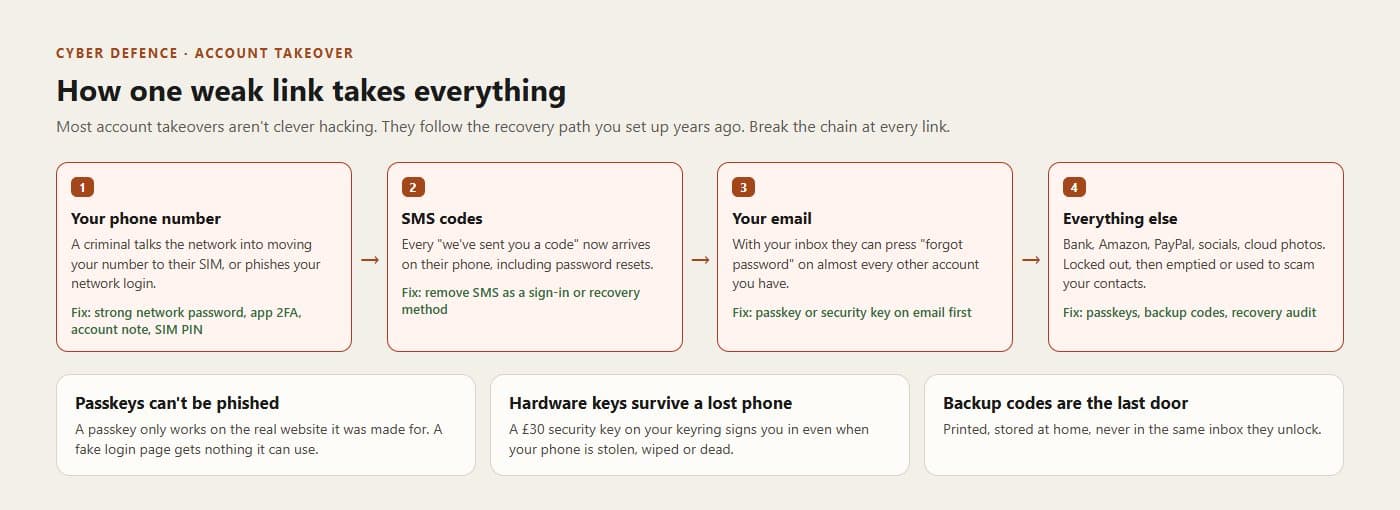
Protect from the left: the phone number and the email inbox open everything to their right. Phishing beats codesA convincing fake login page asks for your password and then your six-digit code, and relays both to the real site in real time. Authenticator app codes and SMS codes both fall to this. That's why the advice has moved on from 'turn on two-factor' to 'use passkeys'.
A passkey can't be phishedIt's a cryptographic key pair made for one website. Your device keeps the private half and only uses it after your fingerprint, face or PIN, and only for the real web address it was created for. A lookalike site at a different address gets nothing. There's also nothing to leak in a data breach: the website only stores the public half.
The order of workyour email first (it resets everything), then your Apple or Google account (it controls your phone), then your password manager and your mobile network account, then money, then the rest.