Make your terminal look like a pro's (and actually more useful)
Oh My Posh swaps PowerShell's plain prompt for a colourful status bar: your folder, your Git branch and changes, how long the last command took and whether it failed. fastfetch adds a system-info banner on top. Free, no account, and every change can be undone.
30 minBeginnerTools: FreeStep 1 free
Tested 9 Oct 2026 · Oh My Posh 31.6.0, fastfetch 2.69.0, Meslo Nerd Font 3.5.1, Windows PowerShell 5.1, Windows 11A prompt that shows your folder, Git branch and changes, how long each command took and whether it worked
125 built-in themes you can try with one line, plus a ready-made orange and black Cracked AI theme to download
A system-info banner with fastfetch, plus a version that's safe to screenshot
- Exact undo commands for every change
Before you start
01/06Install Oh My Posh0 done- Windows 11 with Windows Terminal (it comes with Windows 11; open Terminal from the Start menu), or a Mac with Homebrew ↗. Mac lines are labelled in each step
- About 240MB of disk space: Oh My Posh is 15MB, the Meslo font pack about 200MB once installed, fastfetch under 20MB
- An internet connection for the downloads
- Optional: Git, so you can see the Git part of the prompt. Level 0's install anything from GitHub sets it up
STEP 01 of 06~3 min
Install Oh My Posh
Oh My Posh is one small program that draws your prompt. Nothing changes until you switch it on in step 3.
The prompt is the text before your cursor. PowerShell's own one only shows the folder you're in. Oh My Posh replaces it with a row of coloured blocks that answer questions you'd otherwise type commands for:
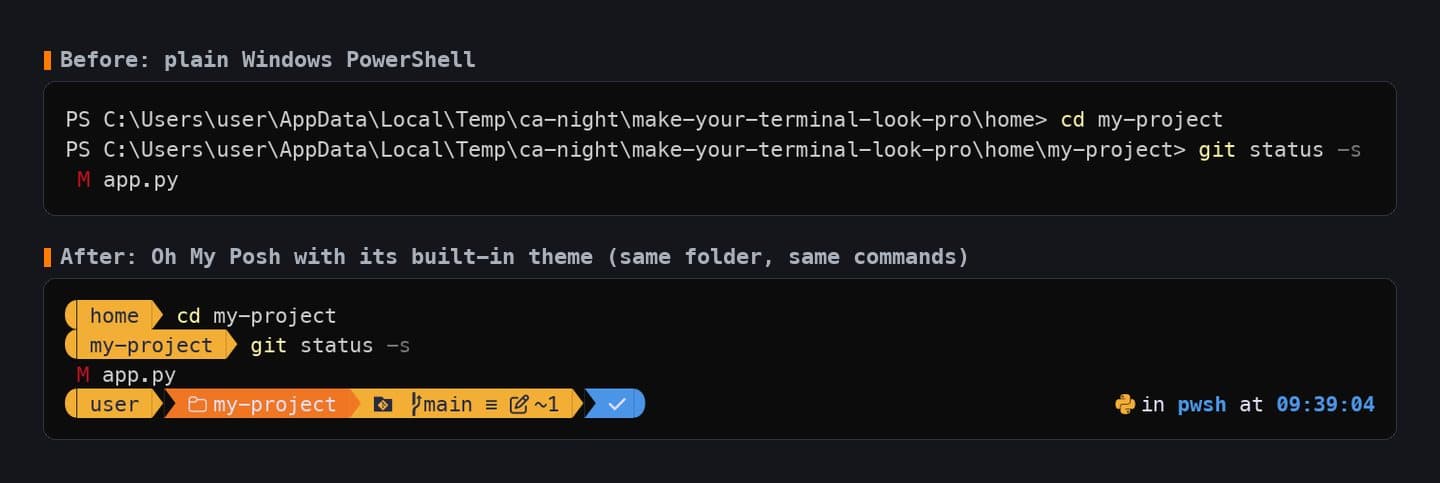
Real output, drawn with the MesloLGM Nerd Font in Windows Terminal's default colours. Same folder, same two commands. The ~1tells you a file has changed before you even rungit status.Open Terminal and install it with winget:
Windowswinget install JanDeDobbeleer.OhMyPosh --source wingetMac (official docs)brew install jandedobbeleer/oh-my-posh/oh-my-poshClose the terminal, open a new one, and check it's there:
Terminaloh-my-posh versionOutput31.6.0TipCan't use winget? The same program is a single file,posh-windows-amd64.exe, on the GitHub releases page ↗. On a Mac, Oh My Posh's docs recommend iTerm2 over the built-in Terminal app, which only shows 256 colours.
✓
Checkpoint
oh-my-posh version prints a version number.If it breaks'oh-my-posh' is not recognised
'oh-my-posh' is not recognised
Close every terminal window and open a new one. New programs only show up in windows opened after the install.
Next mission · Level 0: The basicsInstall apps on a locked-down laptop, no admin password needed
→