Run a ChatGPT-style AI on your own laptop
Google's Gemma 4, running on your machine with Ollama. No account, no subscription, and it keeps answering with the Wi-Fi switched off, because nothing you type leaves your computer.
- 8GB of RAM minimum, 16GB recommended
- About 7GB of free disk space
- Level 0 isn't required for this one. All you need is a terminal window.
Install Ollama
Ollama is the free, open-source engine that downloads and runs AI models for you.
Download the installer from the official site, ollama.com/download ↗, and run it. Or install it with one command:
Windowswinget install --id Ollama.Ollama -eMac (or use the download)brew install ollamaLinuxcurl -fsSL https://ollama.com/install.sh | shThe Windows installer is about 1.6GB, so give it a few minutes. When it's done, Ollama runs quietly in the background: on Windows you'll see its llama icon by the clock, on a Mac it sits in the menu bar, and on Linux the install script sets it up as a background service.
Open a new terminal and check it's there:
Terminalollama --versionOutputollama version is 0.40.3
ollama --version prints 0.20.7 or newer (0.30.5 or newer if you plan to use gemma4:12b).If it breaksIt says the model needs a newer version of Ollama + 2 more
It says the model needs a newer version of Ollama
gemma4:12b arrived in 0.30.3 and needed 0.30.5 to stop crashing on Windows and Linux. Run the installer or winget upgrade --id Ollama.Ollama -e again (brew upgrade ollama on a Mac, the same curl line on Linux), then check ollama --version.'ollama' is not recognised
'could not connect to a running Ollama instance'
ollama serve in a separate terminal window and leave it open.Pick a model that fits your machine
Bigger models are smarter but need more memory. Pick the wrong one and it crawls.
A model is the AI's "brain" file. Ollama has hundreds. For a normal laptop, start with Google's Gemma 4. The small versions were designed to run on laptops and phones.
- 8 to 16GB RAM, no graphics card:
gemma4:e2b(4.6GB download). Start here. - 16GB+ RAM:
gemma4:e4b(6.6GB). Smarter, a little slower. - A gaming PC with 12GB+ of graphics memory:
gemma4:12b(7.7GB).
ollama run gemma4 with no size pulls the latest tag, which points at e4b (6.6GB), not the smaller e2b. Every command in this mission names the size, so you get the same model the lesson was written with.gemma4:e2b.Download it and say hello
One command downloads the model and opens a chat.
- Terminal
ollama run gemma4:e2b The first time, it downloads the model (about 4.6GB, roughly 5 to 15 minutes on home broadband). After that it starts in seconds. When you see
>>>, type a message and press Enter:Output>>> Write a 3-line text to my landlord saying the boiler is broken. Thinking... ... ...done thinking. Here are a few options, depending on how urgent and formal you want to be: **Option 1: Clear and Direct (Recommended)** > Hi [Landlord's Name], > > I am writing to let you know that the boiler is currently broken and not working. > > Could you please arrange for a repair as soon as possible? ...Now the good bit. Turn your Wi-Fi off (or pull the cable), type another question and press Enter. It still answers, because the whole model is on your disk and running on your own processor.
Type
/byeto leave the chat. Run the same command again any time to come back.
If it breaksThe download stalls or fails + 1 more
The download stalls or fails
ollama run command again. It picks up where it left off.It's painfully slow, or your PC freezes
ollama rm and the model name, and try gemma4:e2b. Closing Chrome tabs frees up a surprising amount of memory.Speed it up: skip the thinking
Gemma 4 thinks before it answers. Great for hard questions, slow for simple ones.
By default Gemma 4 "thinks" first: you'll see
Thinking...before the answer. On a 16GB laptop with no graphics card, the boiler text above took 18 seconds with thinking on and under 5 with it off, because the thinking alone ran to more than 300 words. For quick jobs, turn it off:Terminalollama run gemma4:e2b --think=falseAdd
--verboseto see exactly how fast it runs on your machine. Here's a real run on a 16GB Intel laptop with no graphics card:Outputtotal duration: 4.716286s load duration: 17.0933ms prompt eval count: 25 token(s) prompt eval rate: 43.48 tokens/s eval count: 134 token(s) eval duration: 4.576452s eval rate: 29.28 tokens/sAbout 29 tokens a second is roughly 20 words a second, faster than you can read. A short answer took under 5 seconds. The very first run after a restart is slower: loading the model from disk took 49 seconds here, then every answer after that started straight away.
See what's loadedollama psOutputNAME ID SIZE PROCESSOR CONTEXT RUNNER UNTIL gemma4:e2b b37049369adf 970 MB 100% CPU 4096 llamacpp 4 minutes from now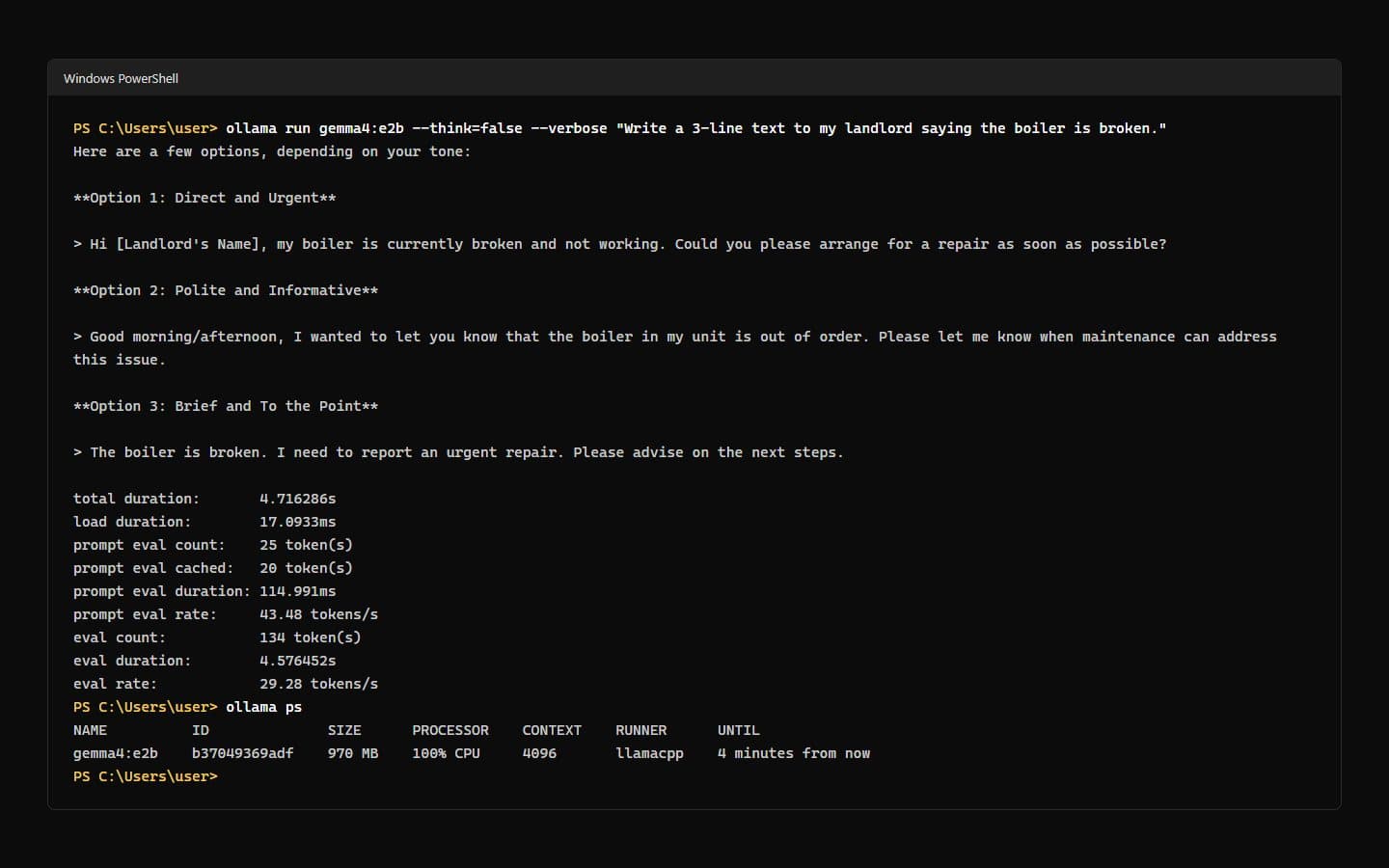
Gemma 4 e2b on an Intel Core Ultra 7 laptop with 16GB and no graphics card: 134 tokens in 4.7 seconds.
Manage your models
Three commands keep your disk tidy and your models up to date.
This is what makes it different from ChatGPT: you can paste private things like payslips, contracts or health questions, and they never go to a server. To look after it:
ollama listshows the models you've downloadedollama rm gemma4:e2bdeletes one to free up spaceollama pull gemma4:e2bupdates it to the latest version
ollama list shows gemma4:e2b.Your first wins
It works. Now do something with it.
Summarise something private
Paste a contract, a tenancy agreement or a payslip into the chat. It never leaves your laptop.
Summarise this in plain English. Then list anything unusual, anything I should push back on, and any dates or deadlines I need to know about:

[paste the text here]
Use it as a writing partner
Small local models are great at rewriting. They're weaker at facts, so check anything important.
Rewrite this message so it's shorter, friendlier and more confident. Give me 3 versions:

[paste your message]
Now give it a proper app
The terminal works, but a chat window is nicer. Build your own private ChatGPT puts a ChatGPT-style interface on top of Ollama: chat history, file uploads, and switching between models.
Undo it cleanly
How to remove everything this mission installed.
Delete the model first (this frees the disk space), then uninstall Ollama:
ollama rm gemma4:e2b
winget uninstall --id Ollama.Ollama -e
On a Mac, quit Ollama from the menu bar and drag it from Applications to the Bin. Downloaded models live in a hidden .ollama folder in your home folder. Delete it to remove them all.
On Linux, remove the model with ollama rm gemma4:e2b, then follow the uninstall steps in Ollama's Linux docs ↗: they stop the service and remove the program and its models.
