See every watt in your house, and know which appliance used it
One clamp around the cable into your meter, one second at a time. Home Assistant draws your house's day as a live energy dashboard, a small script recognises the kettle, shower, oven and washing machine from their power signatures alone, and your phone tells you when the iron's been left on and nobody's home. You can run the appliance detective on a sample day before you buy a thing.
- Alerts for big loads left running, heat appliances on while everyone's out, and high night-time power
- A kit: power logger, fingerprinting script, signatures, chart maker, Home Assistant package and monitor comparison
- An energy monitor: Shelly EM Gen3 with 50A clamp (about £39 to £65), an OpenEnergyMonitor emonPi3 (£283.33), or a smart meter feed
- Home Assistant running on a Pi 5, a Home Assistant Green or a spare PC
- Python 3 on your computer for the fingerprinting scripts
- Smart meter feeds (Glow, Octopus) need your own account with that provider; the clamp routes need no account
How one clamp can tell your kettle from your shower
Understand appliance fingerprinting and try it on a sample day before buying anything.
One measurement, the whole houseA current transformer (CT) clamp closes around the live meter tail, the thick cable from your meter to the consumer unit, and measures every amp the house draws. Combined with the mains voltage, that's whole-house power, once a second.
FingerprintsEvery appliance switches on with its own step: a kettle jumps by about 3kW for three minutes, an electric shower by 9kW for as long as you're in it, an oven element by 2.4kW and then cycles on and off as its thermostat works, a fridge-freezer adds about 100W for twenty minutes every hour. Find the steps, pair each switch-on with the switch-off of the same size, and the size and duration tell you what it was. This is non-intrusive load monitoring, the technique energy researchers use.
The kitDownload the kit or open kit.md. Make a sample day of one-second readings and run the fingerprinter on it:
Any computer with Python 3python make_sample_day.py --out sample_day.csv python fingerprint.py sample_day.csvOutputwrote 86400 readings to sample_day.csv start appliance watts mins on 06:52 Kettle 2954 3.3 07:05 Toaster 881 2.5 07:12 Electric shower 9301 8.5 07:40 Kettle 2945 3.0 09:30 Washing machine heater 2053 14.0 09:45 Washing machine drum 221 14.8 (36 runs until 10:34) 10:15 Kettle 3171 2.8 10:17 Unknown 222 9.2 10:40 Washing machine spin 480 6.0 13:05 Kettle 2954 2.9 16:30 Kettle 2937 2.7 16:45 TV and lights 117 554.2 (2 runs until 21:40) 17:45 Oven element 2406 29.4 (13 runs until 18:42) 21:10 Kettle 2955 3.1 appliance runs kWh Electric shower 1 1.31 Oven element 13 1.18 TV and lights 2 1.05 Kettle 6 0.89 Fridge-freezer 28 0.80 Washing machine heater 1 0.48 ... Always on (baseload) 1.91 (79 W all day) whole house 8.11 kWh, explained 96%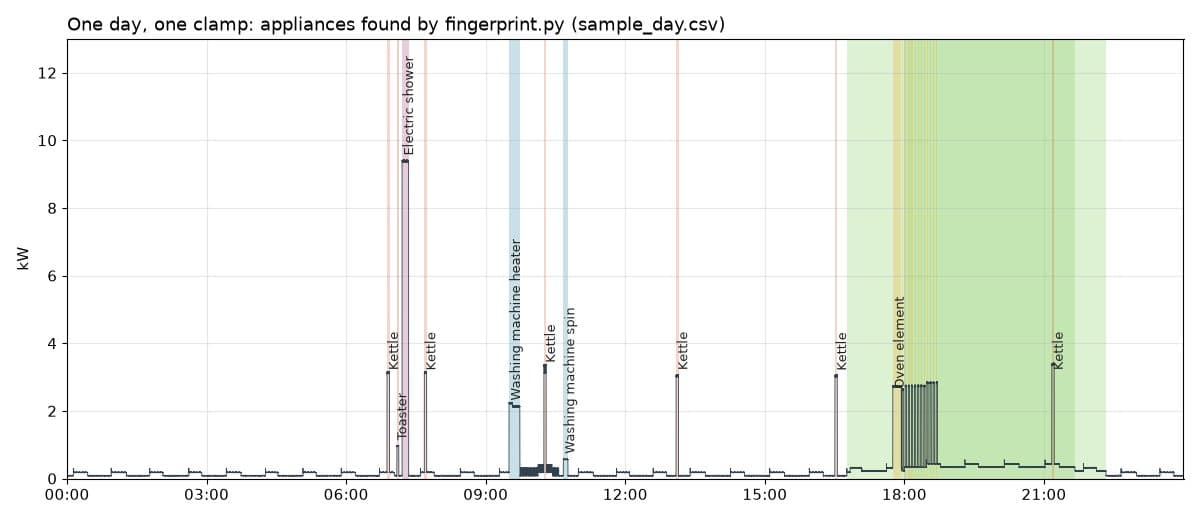
The sample day charted by plot_day.py, every run found by fingerprint.py from the total alone. Look at the bottom lineOn this sample day the always-on baseload (router, standby, alarm, boiler controls) uses more than the shower, the oven or six kettles. That's the first thing a monitor usually shows people.
If it breakspython isn't found
python isn't found
py instead of python, or install Python 3.12 from python.org. The scripts use the standard library only.