Build your own Perplexity that has to prove every fact, on your laptop
Ask a question, walk away, come back to a Markdown report with numbered citations, a sources list and a fact-check section. A local model plans the research, Crawl4AI reads the pages politely, and plain code catches the model when it makes things up.
- Notes the model has to prove with an exact quote, and code that throws away any it can't
- A fact-check pass that flags claims with no source, fake source numbers and claims the sources don't back
- A starter kit with every file, ready to run
- Done first: Run a ChatGPT-style AI on your own laptop (Ollama 0.20.7 or newer and
gemma4:e2b) and Turn any website into clean notes your AI can read (Crawl4AI and uv) - 16GB of RAM recommended. With 8GB, close other apps and set
RESEARCH_NUM_CTX=4096in the settings file. - About 6.5GB of disk: the model (4.6GB), Crawl4AI's Python packages (about 555MB) and its browser (a few hundred MB, already there if you did the Crawl4AI lesson)
- An internet connection. No accounts, no sign-ups, no API keys, nothing to pay.
- Helpful but optional: Ask your own files questions with a local RAG app and Local AI function calling
Get the kit and fill in one setting
Five small Python files, one settings file, and a model that's already on your PC.
Here's the whole agent on one page. The grey boxes are your local model. The orange boxes are plain code, which does the same thing every time. That split is the point of this mission: the model makes the judgement calls, and code checks its work.
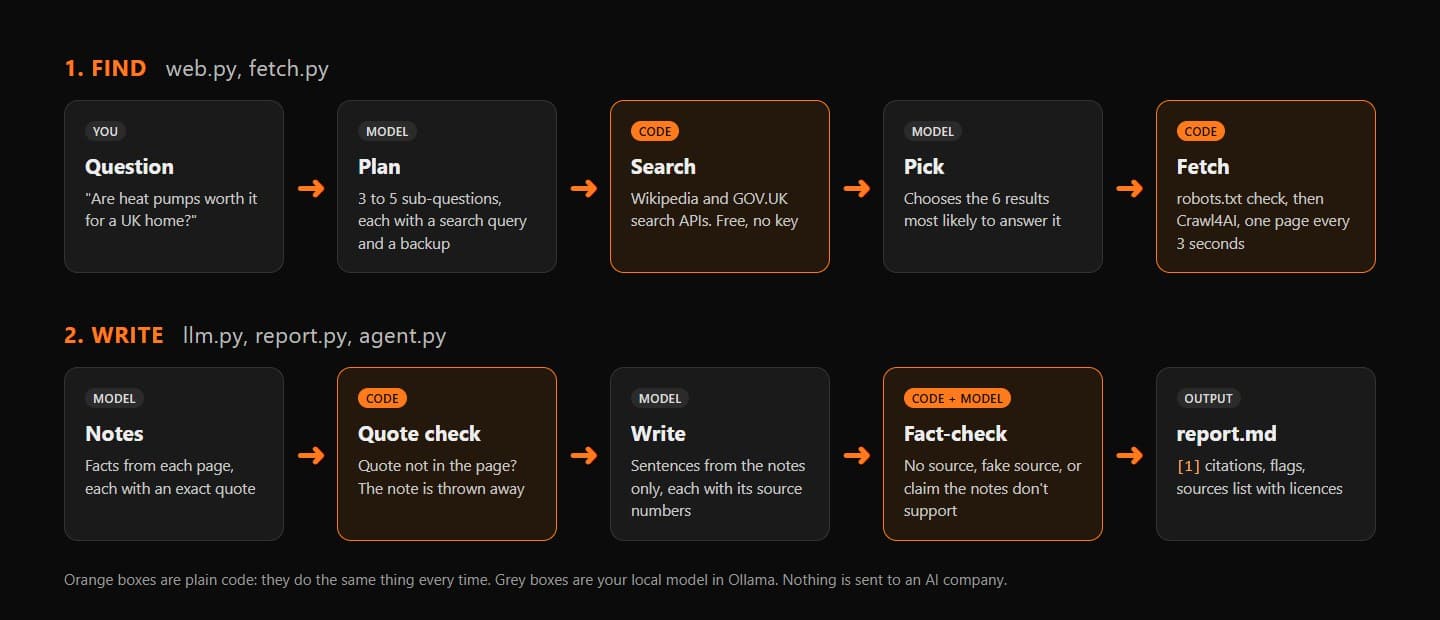
The pipeline. Each box is one function in the kit. If you've done Local AI function calling, you've seen a model choose which tool to run. Here the loop lives in code instead, and the model makes choices inside it: which sub-questions to ask, which pages to read, whether a claim is backed up. With a small local model, that's far more predictable.
Download the starter kit: research-agent.zip. Unzip it into your home folder and make your settings file from the example:
Windowscd $HOME\Downloads Expand-Archive research-agent.zip -DestinationPath $HOME cd $HOME\research-agent Copy-Item .env.example .env notepad .envMac / Linuxcd ~/Downloads unzip research-agent.zip -d ~ cd ~/research-agent cp .env.example .env open -e .env.env# Copy this file to .env and fill it in. .env stays on your PC (it's in .gitignore). # Who runs this bot: your email address or a website. Wikipedia asks every program for one. RESEARCH_CONTACT=you@example.com # The Ollama model. gemma4:e4b is smarter if you have 16GB or more of RAM. RESEARCH_MODEL=gemma4:e2b # The model's reading window, in tokens. Drop to 4096 if your PC struggles. RESEARCH_NUM_CTX=8192 # Characters kept from each page (roughly 4 characters per token). RESEARCH_MAX_CHARS=8000 # Seconds between page fetches. Don't go below 2. RESEARCH_DELAY=3 # false = no thinking (fastest). Use auto for a model without a thinking mode. RESEARCH_THINK=false # Where Ollama listens. Leave it unless you've moved Ollama. OLLAMA_URL=http://127.0.0.1:11434Change
RESEARCH_CONTACTto your email address or a website, and save. Why: Wikimedia's User-Agent policy ↗ asks every program to say who runs it, and scripts that don't "may be blocked without notice". The agent puts this in every request it makes, and refuses to start while it still saysexample.Tip.envis listed in the kit's.gitignore, so it stays out of Git if you put the project on GitHub. There are no secrets in it today, but it's the right home for an API key if you add a source that needs one later.Check Ollama is running and has the model. If
gemma4:e2bisn't listed, runollama pull gemma4:e2b(4.6GB):Terminalollama listEvery command in this mission starts with
uv run. Each.pyfile begins with a short# /// scriptheader listing what it needs, so uv sets up the right Python and packages for it the first time you run it. You never activate anything.
research-agent folder with .env in it, your contact details are saved in .env, and ollama list shows gemma4:e2b.If it breaks'uv' is not recognised + 2 more
'uv' is not recognised
winget install --id astral-sh.uv -e on Windows, brew install uv on a Mac), then open a new terminal.Expand-Archive says a file already exists
-Force to overwrite, or delete the old research-agent folder first if you don't need anything in it."could not connect to a running Ollama instance"
ollama list again.